NoPOS

The till keeps ringing when everything else goes down.

NoPOS is a point of sale for pizza, QSR and sit-down restaurants, from a single shop to a 200-store franchise group. Every till and kitchen screen carries the whole store, so there is no server to fail, order numbers never jump, and Uber Eats and Mr D orders never go to manual capture.

Store network 6/6 Internet connected Uber Eats and Mr D live

Every sale saved on the till and shared with the other devices.

Built for the Friday you've already had.

If you run stores, you've seen these. NoPOS was designed around each one.

The back-office server dies and the kitchen screens go blank.
There is no server to die. Every till and kitchen screen holds the whole day's orders and talks to the others directly. Lose any device and the rest carry on.
The internet drops and the tills start numbering orders differently.
Order numbers are made on the till by the same rule, online or offline. Nothing switches when the line goes down, so nothing changes.
Uber Eats and Mr D orders come through twice, or have to be captured by hand.
Delivery-app orders arrive straight on the till and kitchen screen. A repeated delivery merges into the same order, and an order is only accepted once a device in the store actually has it.
Load shedding cuts the power mid-sale.
Each sale is written to disk before the screen confirms it. When the power comes back, the till picks up where it left off and catches up from its neighbours.
Rural stores on LTE that's working one minute and gone the next.
The store trades on its own network and syncs when it can. If the link stays down, delivery apps pause automatically and resume once it's stable, without flapping on and off.

One system from the counter to the customer's door.

Every screen below is the real product, running on demo data for a made-up brand, Fornaio Pizza.

Till and tables

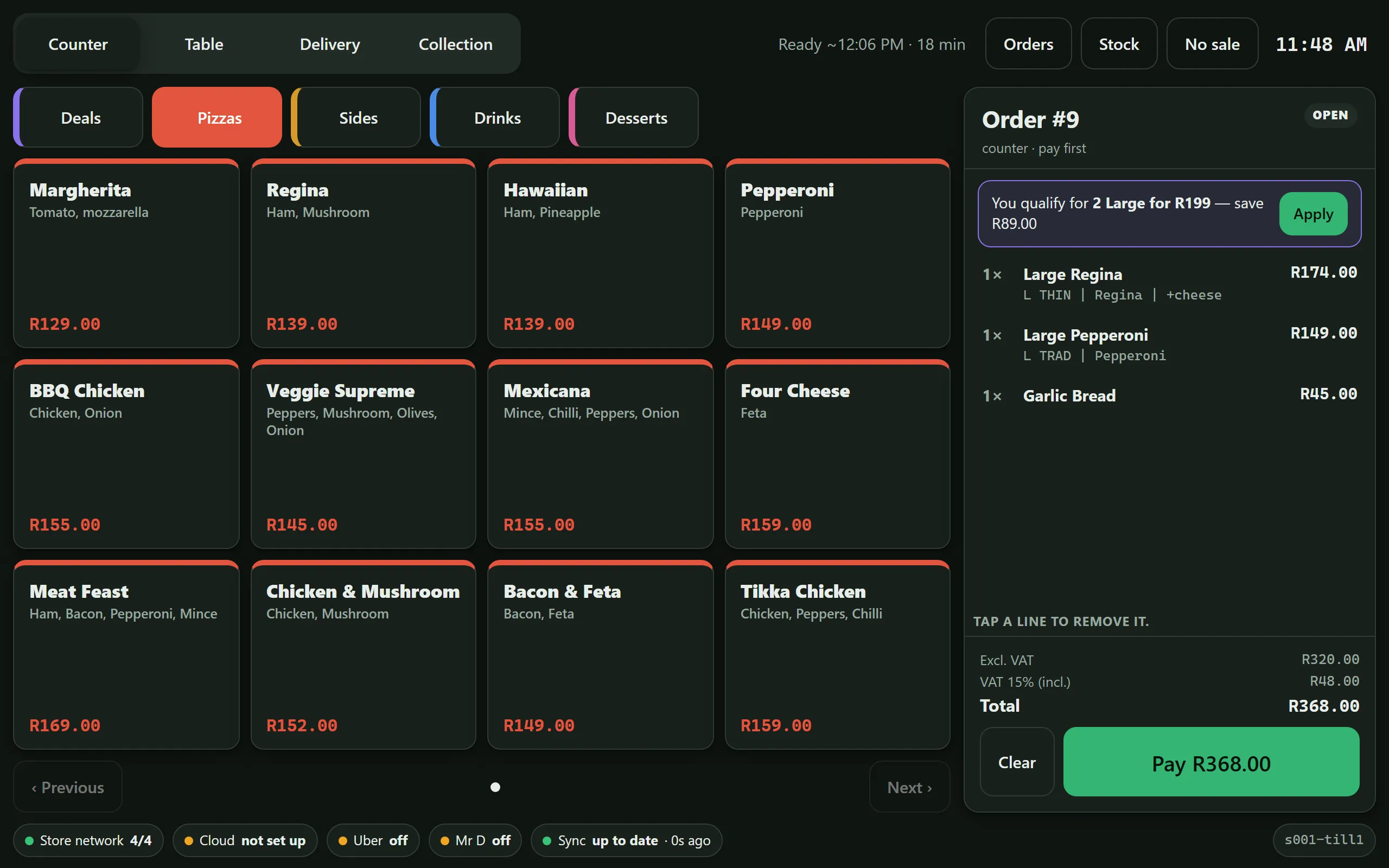
Counter, tables, collection and delivery on one screen, built for fast fingers on a busy Friday.

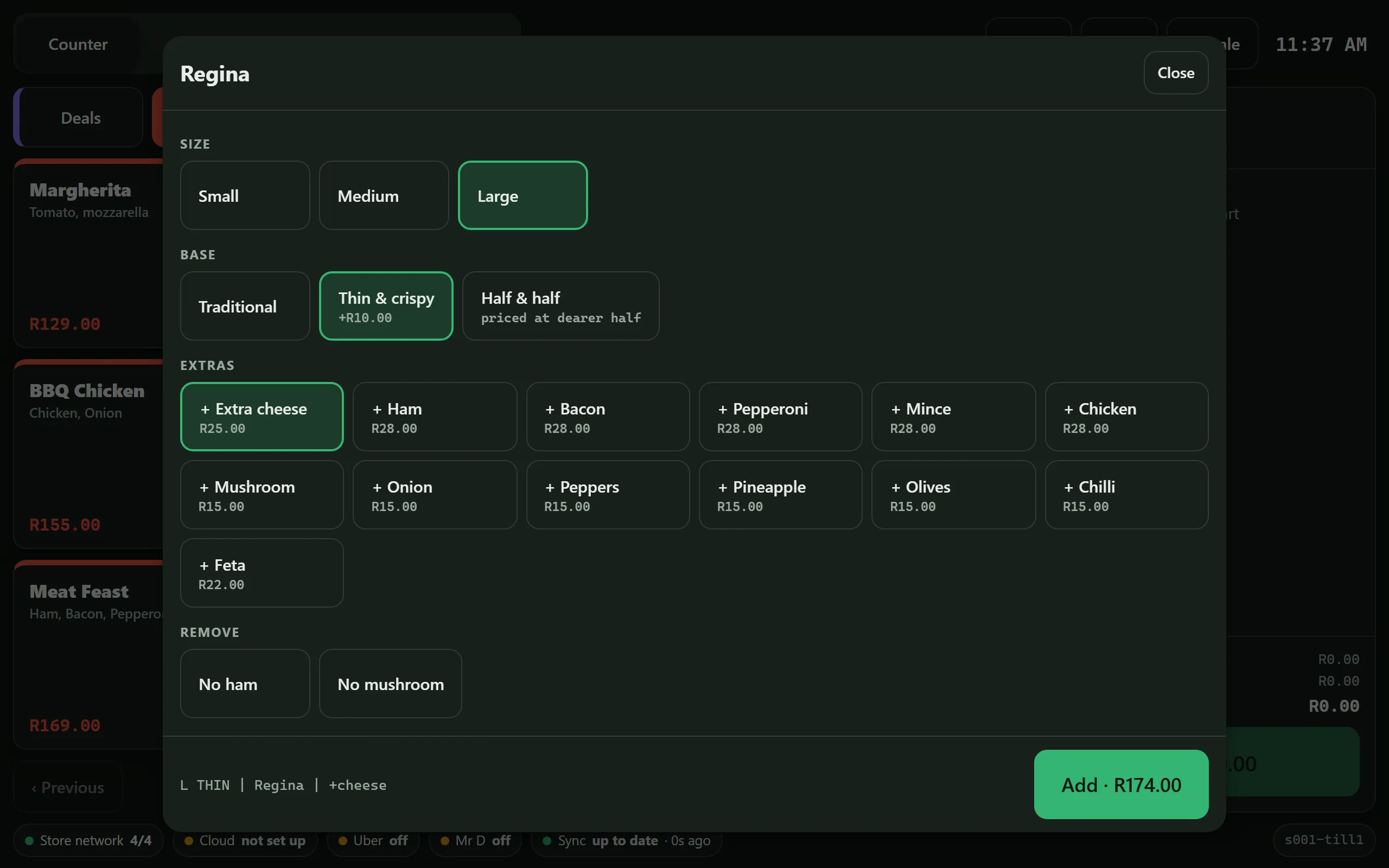
  • A large pizza in two taps, half and half with extras in about five.
  • Deals suggested the moment an order qualifies: "You qualify for 2 Large for R199, save R89".
  • Tables with seats and courses: send starters, hold mains, fire when ready.
  • Cash, card on your own terminal, split by seat or evenly. Voids and refunds need a manager PIN.
  • Honest ready times, worked out from what's already in the oven.
NoPOS till: pizza menu grid on the left, order panel on the right with a Large Regina on thin base with extra cheese, a Large Pepperoni and garlic bread, and a prompt to apply the 2 Large for R199 deal.
Pizza builder on the till: size, base, half and half, extras with prices and removals, with an Add button showing the price.

Kitchen screens and oven pacing

Each station sees exactly what to make, in the order it needs to come out.

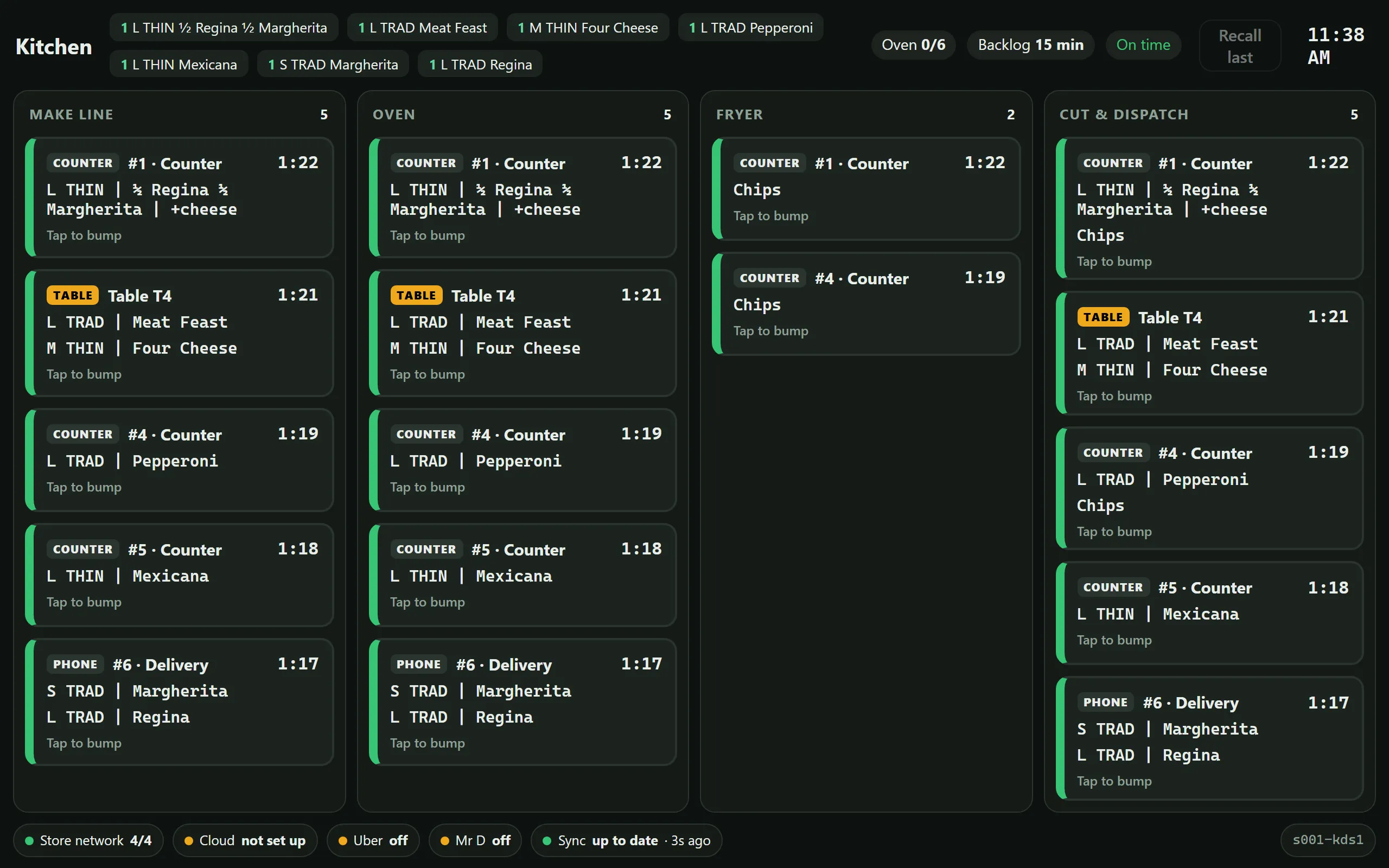
  • Tickets per station show the build, half by half: "L THIN | ½ Regina ½ Margherita | +cheese".
  • Fired by promised time, not arrival, so a 19:10 delivery doesn't hold up an 18:35 collection.
  • NoPOS knows the oven's capacity and shows how far behind the kitchen is running.
  • When the backlog grows, prep times on Uber Eats, Mr D and your own channels go up on their own, and pause if it gets out of hand.
  • Touch to bump, one tap to recall. Kitchen printers too, printed once, even if a till dies.
NoPOS kitchen screen with make line, oven, fryer and cut and dispatch columns, each showing tickets with order numbers, channel, pizza builds and timers. Header shows oven slots, backlog and on time.

Menu boards

Your digital menu boards run from the same menu as the tills, so prices and deals are never typed twice.

  • Mark ham out of stock on a till and every ham pizza greys out on the board within a second.
  • Breakfast, lunch and late-night menus switch on their own.
  • Brand templates with locked areas; franchisees change only what HQ allows.
  • Runs on an Android stick or a smart-TV browser, and keeps showing the menu if the internet drops.
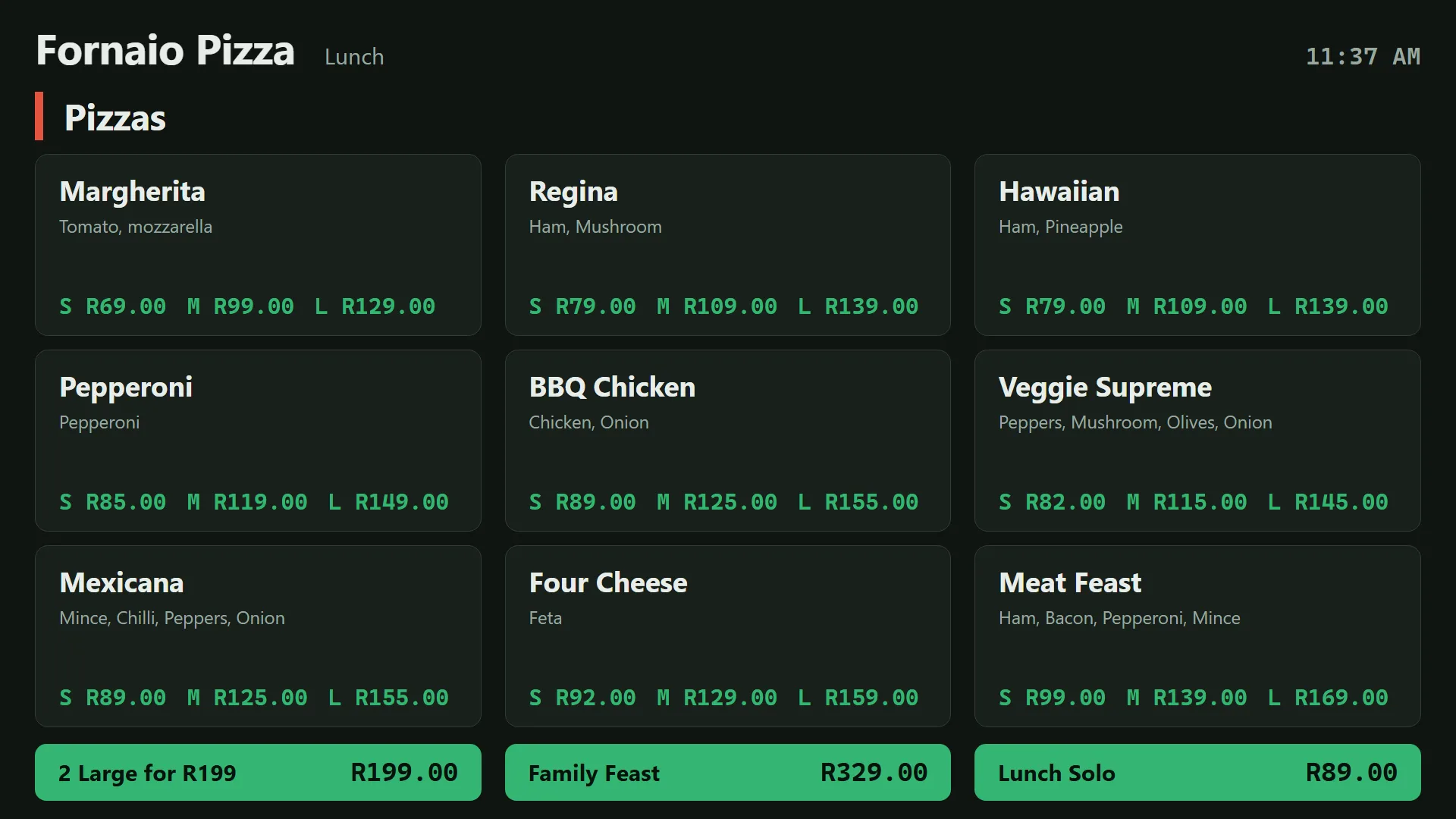
Menu board on a TV showing Fornaio Pizza's lunch menu: pizzas with small, medium and large prices, and deals for 2 Large for R199, Family Feast and Lunch Solo.

Online ordering, WhatsApp and your own drivers

Your own branded ordering site and apps, plus ordering inside WhatsApp. No commission to anyone.

  • Customers sign in with a code sent to WhatsApp, drop a pin on their door and see the nearest store that delivers there.
  • The full menu, including half and half and deals, with live stock.
  • Pay by card through Peach Payments, with saved cards, wallet, vouchers and loyalty points.
  • Paid orders go straight into the till and kitchen. If a store rejects one, the customer is refunded automatically.
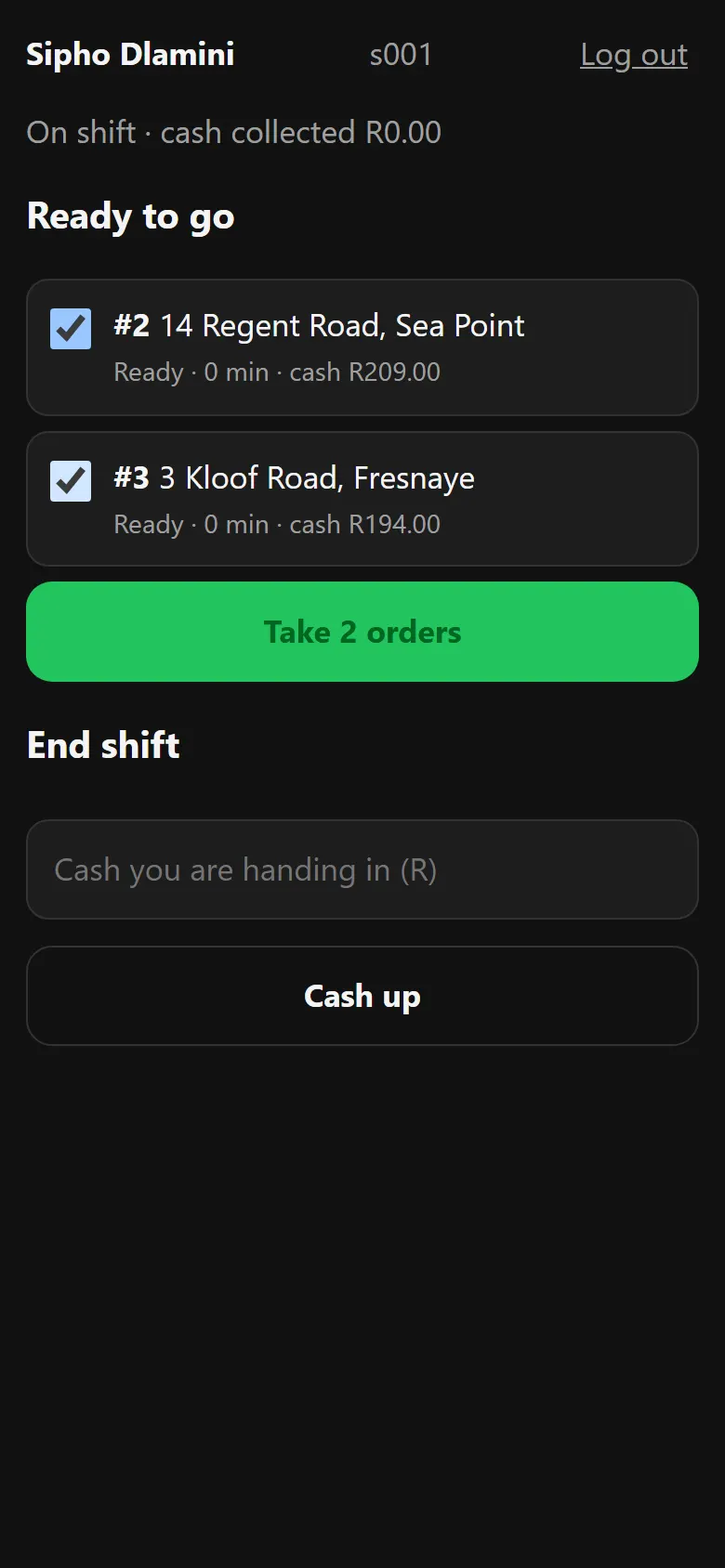
  • A driver app for your own drivers: trips from the dispatch station, live tracking for the customer and proof of delivery. Orders are paid before they leave the store, so drivers never handle cash.
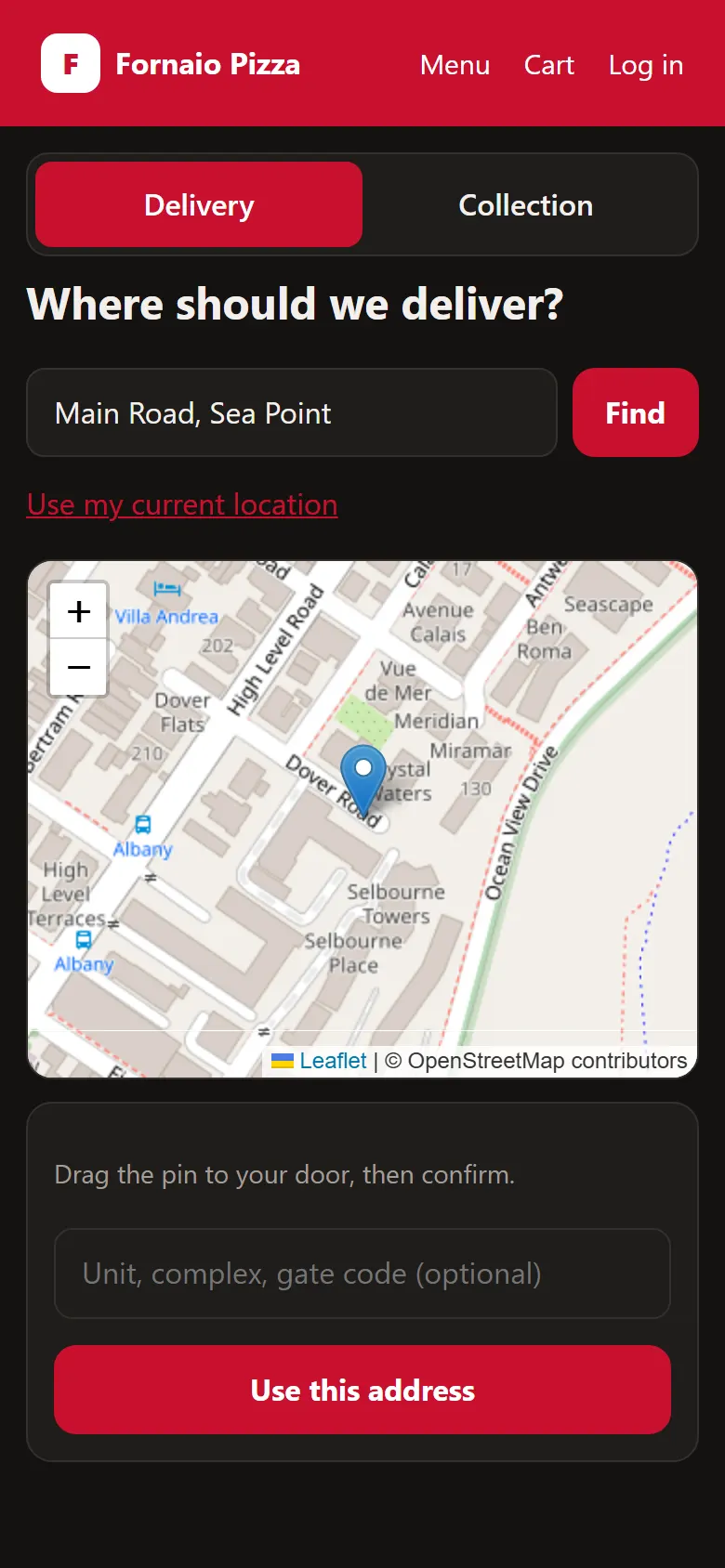
Ordering app: delivery address search with a map pin on the customer's door in Sea Point.
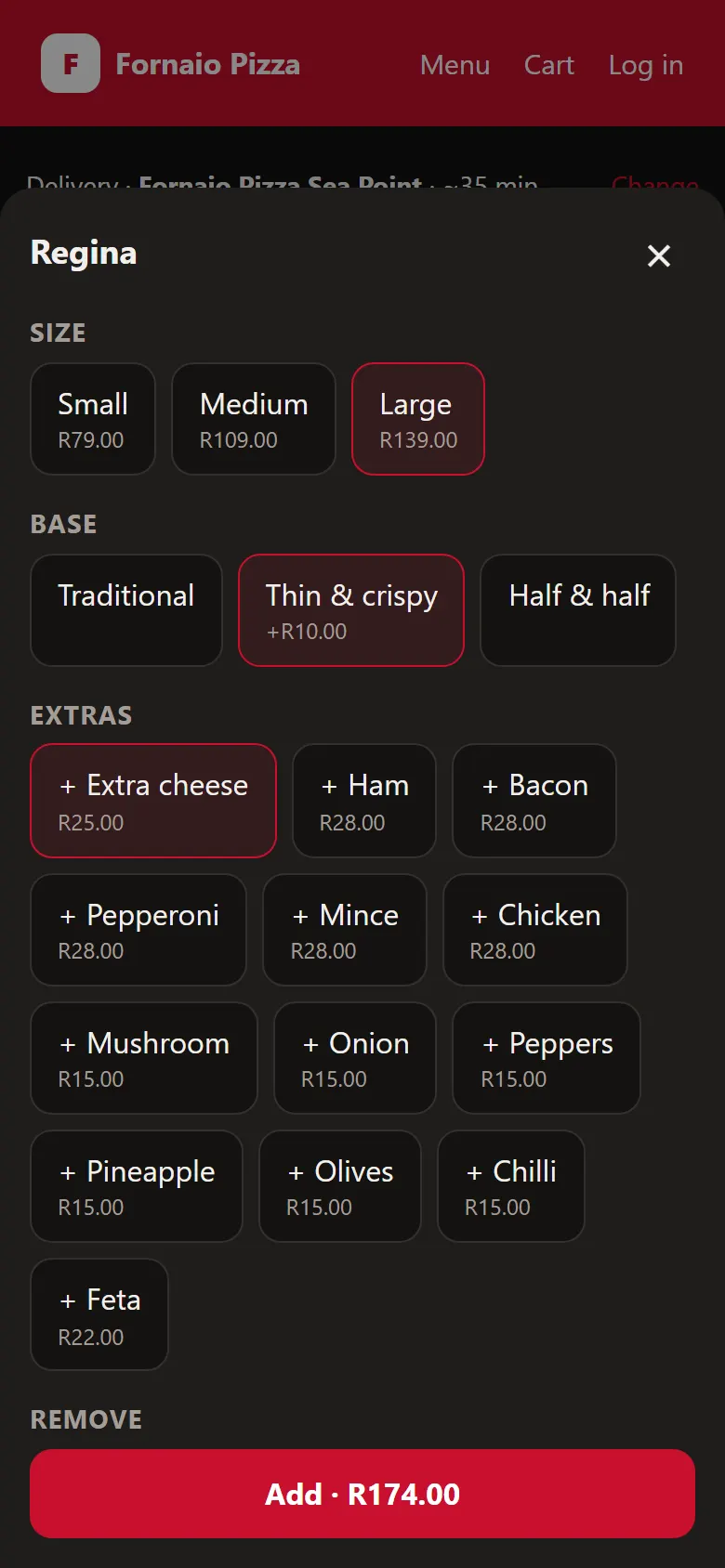
Ordering app: building a Regina pizza with size, base and extras, and an Add button with the price.
Driver app: two delivery orders ready to go with their addresses, and a Take orders button.

From your current setup to trading on NoPOS.

  1. Install on the tills you have

    Windows tills get an installer that works offline; Android devices get an app. Your Epson printers and card terminals stay.

  2. Pair the store's devices

    The first till shows a short code. Type it on each other till, kitchen screen and board, and they find each other on the store network.

  3. Publish the menu from HQ

    Set the menu, prices, hours and delivery zones once. Every device, the ordering site, WhatsApp and the delivery apps pick it up.

  4. Trade, online or offline

    From here the store runs on its own. The internet is only needed for delivery-app orders, reporting and HQ changes.

Run 200 stores from one screen.

Head office sets the menu, prices, hours and delivery zones once. They reach the tills, menu boards, ordering site, WhatsApp, Uber Eats, Mr D and Google Business Profile. Franchisees change only what you unlock.

  • Menus by brand, region and store, with locked fields and price bands for franchisees.
  • Store and channel switches: pause delivery for every store in a region in one action.
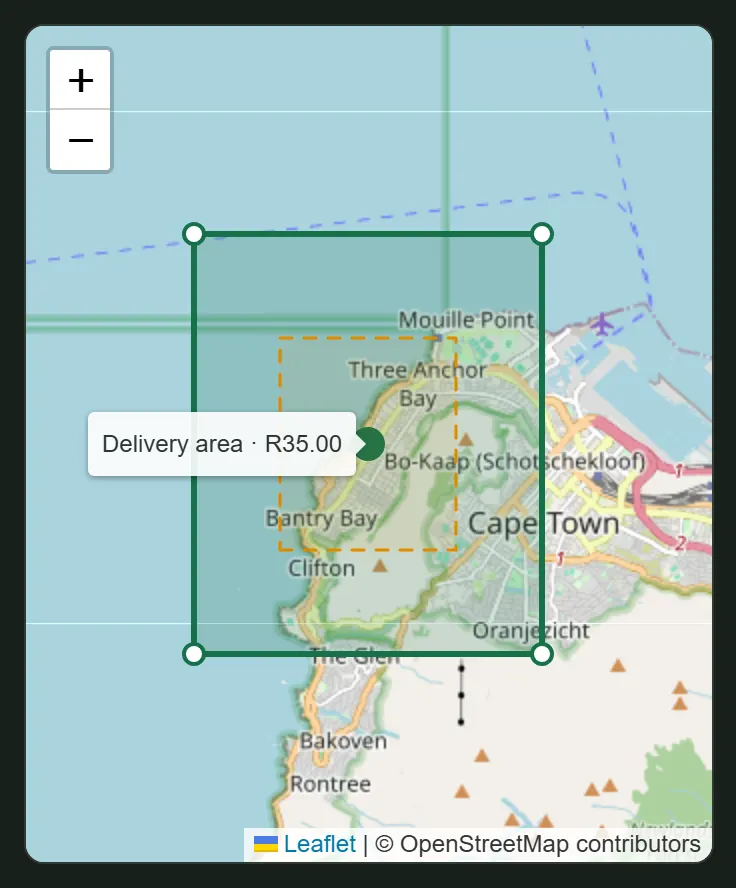
  • Delivery zones drawn on a map, with a fee, minimum order and ETA per zone, and smaller zones at peak.
  • Approvals and an audit trail for price drops, store closures and role changes.
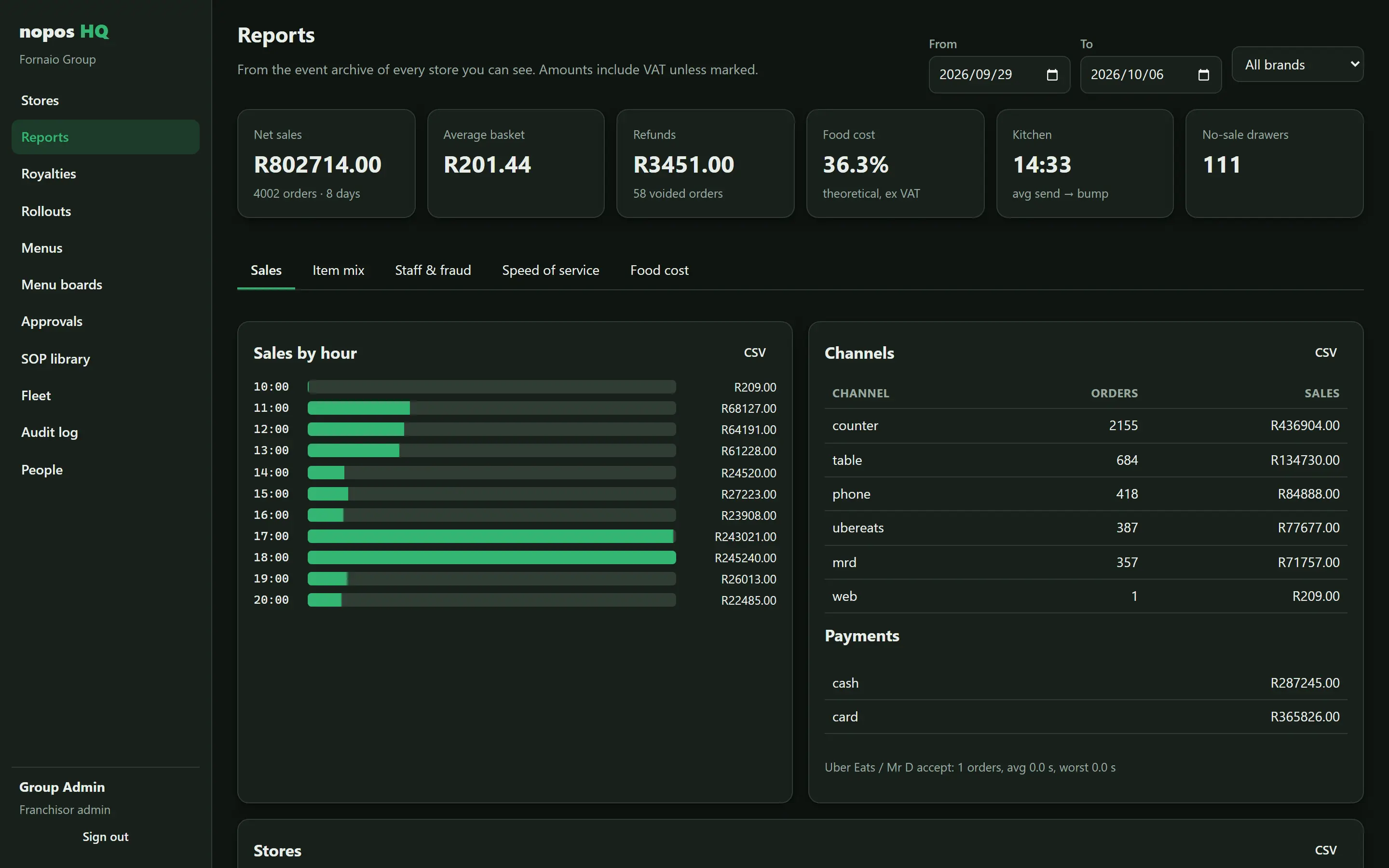
  • Sales, food cost and staff signals: theoretical against actual food cost, voids after send, refunds and no-sale drawer opens.
  • Royalty and marketing-fund statements per franchisee, split per brand.
  • Staged rollouts: new menus and updates reach five stores first and stop on their own if something looks wrong.
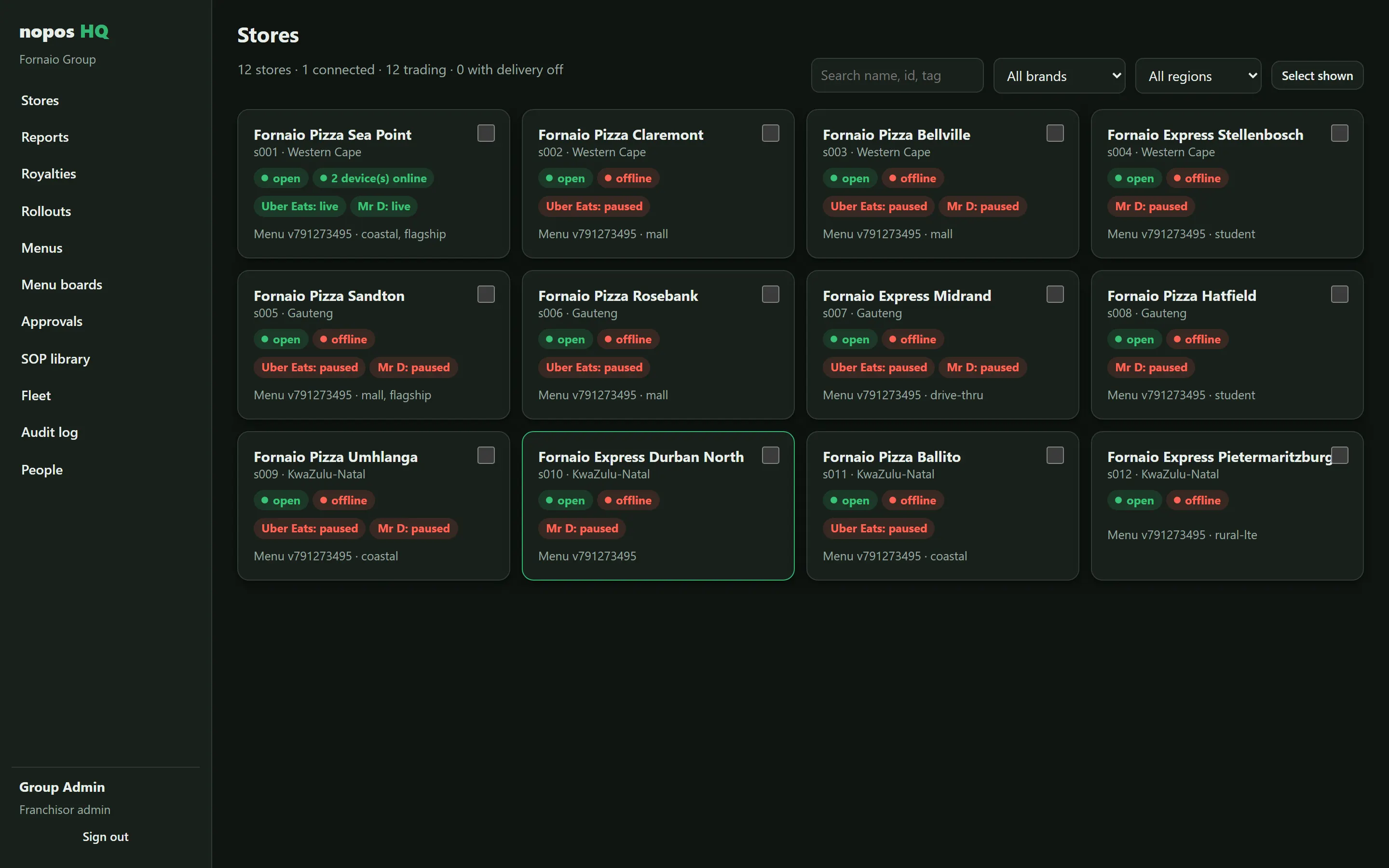
HQ store grid: twelve stores across Western Cape, Gauteng and KwaZulu-Natal, each with trading status, devices online, Uber Eats and Mr D status and menu version.

Built for South Africa.

Load shedding

Sales are on disk before the screen confirms them. Tills restart, catch up from each other and carry on, with nothing to re-capture.

LTE and rural stores

Built for links that drop. One device with signal is enough to keep delivery-app orders flowing; a SIM in an Android till can be the backup route.

POPIA

Customer phone numbers and addresses are kept only as long as needed, can be exported or deleted on request, and never go to an AI service.

VAT receipts

Prices include 15% VAT and every receipt shows the VAT amount, with sequential invoice numbers per till.

Payment-neutral

Use the bank and terminals you have. NoPOS never takes a cut of your card payments.

Your hardware

Runs on Windows 10 IoT tills with 2 GB of RAM, Android POS devices with built-in printers, and Epson network printers.

Works with

  • Uber Eats
  • Mr D
  • WhatsApp
  • Google Business Profile
  • Peach Payments
  • Epson printers
  • Sunmi and iMin Android POS
  • Windows 10 IoT
  • Your card terminal

Uber Eats, Mr D, WhatsApp and Google connections need each provider's approval for your business.

Tested well past a busy Friday.

From our own load test: one store with a server, six tills and three kitchen screens, taking 10 orders a second plus a cloud order every second, for five minutes.

2,802 orders completed, none failed

0 duplicate delivery-app orders

74 ms for 99% of tills to confirm a sale

10% average CPU on a single-core till

A busy pizza store on a R120,000 Friday takes about one order every 15 seconds at peak.

Need the hardware too?

Tills, receipt printers, cash drawers, barcode scanners and kitchen screens that work with NoPOS, from our online shop. Prices include VAT, paid securely with PayFast or EFT.

Shop now (opens in a new tab)

Questions owners ask.

Can we move over from our current POS?

Yes. We import your menu, staff and stores, and run NoPOS next to your current system in one store first. Stores move over one at a time, so nobody has to switch everything on a single night.

Which hardware do you support?

Windows 10 and 11 tills, including Windows 10 IoT with 2 GB of RAM; Android POS devices such as Sunmi and iMin; iPads for waiters and managers; Epson network receipt and kitchen printers; and any screen with a browser for menu boards.

What happens when the internet goes down?

The store keeps trading: tills, kitchen screens, printers, tables and cash-ups all work on the store network. Delivery-app orders pause until the link is back, and everything syncs to HQ afterwards.

Do we have to change card terminals or bank?

No. NoPOS is payment-neutral and connects to your terminal. If a card payment times out, NoPOS checks the terminal before trying again, so a customer is never charged twice.

Who owns the data, and is it POPIA-compliant?

You own your sales, menu and customer data, and can export it at any time. Customer personal information is kept to what's needed, deleted on request and never sold or shared.

Do you send our data to AI services?

Not unless you switch a feature on. Menu and store information can power things like WhatsApp ordering; sales figures go only to a model you approve, as totals; customer details never leave.

What does it cost?

A monthly fee per store, with no commission on your sales or card payments. Ask us for pricing for your number of stores and devices.
Pull the cable in your own store.

We'll set NoPOS up next to your current system, unplug the internet in the middle of service, and you can watch what happens.

Book a demo

Or email us